Meeting, publication and compliance records for parish, town and community councils
This guide describes how to use Clerkly. It records what the council did, publishes what the public is entitled to see, and states what the law requires with a citation. It does not say whether a council has complied.
September 2026 · Tweed Tyne Technologies Ltd
How to use this guide
This is the clerk’s manual for Clerkly. The HTML, PDF and EPUB editions are generated from the same text.
This edition is September 2026. Digital edition. HTML, PDF and EPUB from the same source. Tweed Tyne Technologies Ltd publishes it as part of the product.
The three editions
How each edition is meant to be used.
Edition
What it is
This page
The screen edition. Headings are links. Figures are the same annotated screenshots used in the product’s help articles.
PDF
The print master. A4 pages, running headers, page numbers, and the Clerkly wordmark. Print it, or keep it as a file.
EPUB
The ebook. Reflowable text for a reader, a tablet, or a phone. Chapter files and a table of contents the reader can navigate.
Printing this page from a browser produces a paper copy laid out for A4. Running headers and page numbers are in the PDF edition.
Who this is for
A clerk or assistant who schedules meetings, issues a summons, takes minutes and keeps the record.
A responsible financial officer who records payments, the ledger, and the annual return.
A chair or councillor who needs the next meeting, the actions they own, and the declarations they have made.
An internal or external auditor granted time-limited access to the records of one council.
How pages and buttons are named
Button labels, page titles and status wording in this guide are the words on the screen. Paths such as Meetings → the meeting → Agenda are the clerk application’s navigation, not legal citations.
Signed-in work happens on the clerk application. Each council’s published pages are on that council’s own hostname, or on a hosted site until one is pointed. This guide is not a council’s published site.
What this guide does not do
It does not give legal advice, and it does not decide whether a resolution was properly passed.
It does not reach a legal conclusion about a named council or an exemption.
Model standing orders and model financial regulations are published by NALC and One Voice Wales to their members and are not reproduced here.
England and Wales
Clerkly is for parish, town and community councils in England and Wales. Country is recorded when the council is created. Screens and help topics that apply only in one country are hidden in the other. The clerk application is in English.
Statutory figures — notice periods, fees, thresholds, the section 137 per-elector amount — are not written into this guide as numbers. They live in the statutory register, versioned with an effective date, and each row cites its legal source. The product resolves them for the council’s country on the date in question. The Statutory register and Fees and thresholds pages show the figures in force for this council today.
Chapter 1What Clerkly is
Clerkly is software for clerks of parish, town and community councils in England and Wales.
It records what the council did, publishes what the public is entitled to see, and states what the law requires with a citation. It does not say whether a council has complied.
What it records
Meetings, with the statutory notice deadline computed at scheduling and stored.
Agendas, minutes, resolutions, attendance and actions.
Publications with a SHA-256 of the exact bytes served, kept as an evidence record.
Confidential items, excluded from every published surface.
Payments that a meeting approved, as one amount on the schedule, the ledger and the transparency report.
The compliance position: what the law requires, by when, and whether this council has a record of having done it.
The annual governance assertion workspace, which never pre-answers.
A complete copy of the council’s data, which a clerk can export.
The three surfaces
Where each surface lives.
Surface
Who uses it
Address
This guide and the product homepage
Anyone reading about the product
www.clerkly.org.uk
The clerk application
Signed-in clerks, members and auditors
app.clerkly.org.uk
Council public sites
Residents and anyone entitled to see published papers
The council’s own hostname, or sites.clerkly.org.uk until one is pointed
How Clerkly talks
Every help panel has the same shape: what the law requires, what this product does about it, and the provision with a link to the primary text. Status wording reports dates and comparisons. It does not use verdict words.
Examples of wording the product uses, and wording it does not use.
The product says
The product does not say
The notice given met the required period / was shorter than the required period
The meeting was validly convened
Past its date / Due today / Done
A verdict about the council
Budgeted minus ledger
The difference is a problem
The draft was published after the period
The council missed a duty
The product is an evidence system
The audit log and the publication record are append-only. A change is a new row. Withdrawal of a publication leaves the previous row as the evidence. Approved minutes are not edited in place: a correction is a later version, approved at a later meeting, and the earlier version becomes superseded rather than disappearing.
Generated evidential documents — minutes, agenda, notice — are also served as PDF/A-2u copies. A PDF a council uploads itself is the council’s file and is not generated by Clerkly.
JavaScript is not required
Creating an account, confirming the address, signing in, and the ordinary forms on the clerk application work with JavaScript off. Navigation that would otherwise be a menu is a native details element. That is deliberate: a clerk working in a parish hall should not depend on a script having loaded.
This is a new service
The clerk application shows a Beta banner. Native applications for Android, iOS, Windows and macOS exist as sign-in and destination shells. The complete product a clerk uses today is the web application at app.clerkly.org.uk.
Chapter 2Getting started
Creating an account, confirming the address, signing in and creating a council are ordinary form posts on the clerk application.
app.clerkly.org.uk/sign-up · Create an account
Create an account
Open Create an account
On the clerk application’s sign-up page. Name, email address and a password.
Confirm the address
If that address can be registered, a confirmation link is sent to it. The link lasts 24 hours. If it has not arrived, the sign-up page can send another without saying whether the address can still be confirmed.
Sign in
The same email address and password open the clerk application. Sign-in is available after the address is confirmed.
Forgotten-password is a separate path: request a reset from the sign-in page, then complete it from the link in the message. The product does not put a reset token in a page the browser can read back.
Create the council
Councils → Create a council · /councils/new
A person invited to an existing council does not create one. Creating a council is for the first clerk of that council in this product.
The form asks for the name as it appears on the council’s notices, the type (parish, town or community), the country (England or Wales), and the turnover band. Those facts decide which statutory regime and which audit route the product will state. Creating the council makes the visitor its clerk.
Setup
Setup · /setup
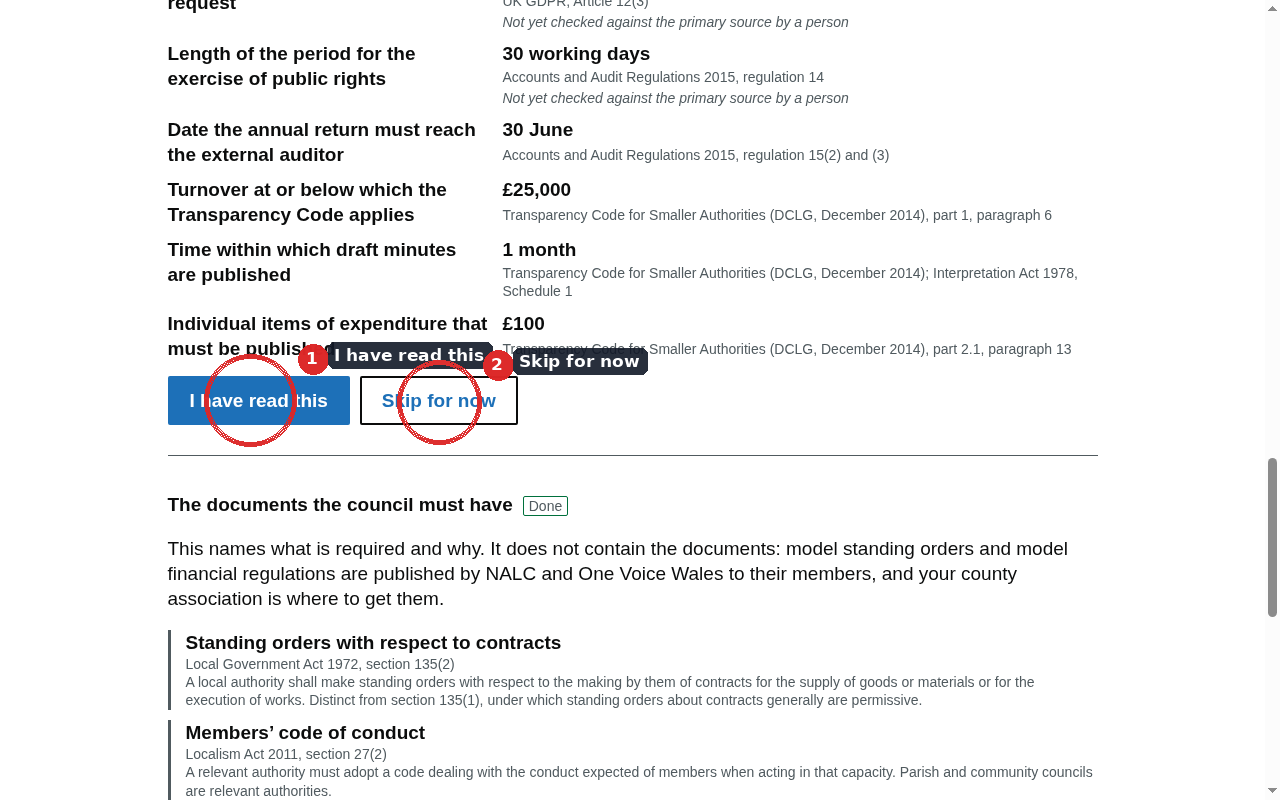
Setup records the first working facts. Every step can be skipped as a recorded decision.
After a council is created, the product opens on setup: meeting bodies, memberships, what the law already requires of this council from country and band, the documents the council adopts, and a first meeting. Progress is stored on the server, so leaving and returning on another device resumes where it stopped.
Each step can be skipped. A skip is recorded as a decision rather than left blank.
The page does not ask for anything that already follows from the council’s country and band. Derived settings are shown read-only, with their legal source.
The rest of the product remains reachable from the navigation throughout.
Leaving setup unfinished leaves a working account. Completing or skipping a step does not say the council is ready for audit, or that a subscription is in force.
Joining an existing council
The invitation is on the Members screen. When outbound mail is configured, a set-password link is emailed to the invited person. Without mail, the clerk is shown the link once on screen. A person who already has an account keeps that one set of credentials.
Import members
Councils → Import members · /councils/import
A clerk can import members from a delimited file. The page previews the rows and asks for approval before anything is written. Importing a name is not a co-option and not an appointment.
Chapter 3Finding your way around
The clerk application is a signed-in workspace. Primary navigation is always visible. Everything else sits under More.
The header
The dark bar shows Clerkly on the left and the council name on the right when a council is selected. A ten-pixel brand bar sits under it. A Beta banner reads “This is a new service.”
A clerk who belongs to more than one council switches council from the account area. Revocation of a membership lands on the next request.
Primary navigation
The six destinations always offered, when the role can read them.
Label
Screen
What it holds
Meetings
/meetings
The meeting list, and the path into each meeting
Actions
/actions
The persistent action register
Payments
/payments
Payment schedules and signatures
Compliance
/compliance
What the law requires, by when, with a source
Members
/members
Who has access to this council
Help
/help
Every guidance topic for this council’s country
More
More is a native details element, so it works without JavaScript. Destinations a role cannot use are shown disabled, with a short reason such as “RFO only”.
Reminders; Annual return; Internal audit; External auditor; Calendar; Public rights; Requests; Subject access; Vacancies; Data incidents; Policies
Council
Council; Branding; Public hostname; Places; People and organisations; Integrations; Audit trail; Export; Statutory register; Fees and thresholds
Account
My council; Account security; Billing
My council
My council is the councillor’s own view: upcoming meetings and own attendance, own actions, own declarations. It does not link to clerk screens. It does not advise on whether to declare. Chapter 17 describes that view.
Sign out
Sign out is a secondary control on the right of the navigation. It ends the session on this device.
Chapter 4Roles and who can do what
A person has one membership per council and may hold memberships in many councils. The role on that membership is what the product checks.
Adding a name to this product is not a co-option and not an appointment. The Members page does not say whether the person holds office.
The roles
Roles offered when inviting a member, and how the product names them.
Role
Shown as
clerk
Clerk
rfo
Responsible Financial Officer
assistant
Assistant
chair
Chair
councillor
Councillor
internal_auditor
Internal auditor
external_auditor
External auditor
read_only
Read only
Who writes, who reads
Ordinary cases. A disabled control names the role that can use it.
Work
Who can write
Who can read
Schedule a meeting, record notice, cancel
Clerk or assistant
Anyone with meeting access
Build and issue the agenda, take minutes
Clerk or assistant
Anyone with meeting access
Publish or withdraw on the public site
Clerk
Publication evidence is readable
Invite members, end a term, withdraw access
Clerk
Membership list
Record finance, open or close a year
Clerk or RFO
Finance readers, including auditors
Record member signatures on a payment
Chair or RFO (approve); clerk records wet or in-person
Finance readers
Release a payment schedule
RFO
Finance readers
Read the audit trail
Clerk, RFO, internal auditor, external auditor
Those roles only
Export a complete copy
Clerk or RFO
The person who runs it
See every declaration
Clerk, chair, internal auditor
A member sees their own
Confidential items
Reading a closed-session item is limited to roles that would be in the room: clerk, RFO, chair and councillor. An assistant who can build the agenda still cannot read the confidential body of an item they cannot sit for. Published surfaces never include that body: the exclusion is a database predicate, not a filter in the page.
Auditor memberships
Internal and external auditor access is scoped and time-limited. An expired membership is no access on the next request. Auditors can read finance, compliance and the audit trail. They cannot publish and cannot change the record.
More than one council
A clerk who serves two parishes has two memberships and one account. Switching council changes which rows the session can see. A query that is not wrapped in that council’s context is refused, rather than returning an empty list that would look like “this council has no meetings”.
Chapter 5Meetings
The meeting is the spine of the product. Notice, agenda, minutes, publication and the payments a meeting approved all hang from it.
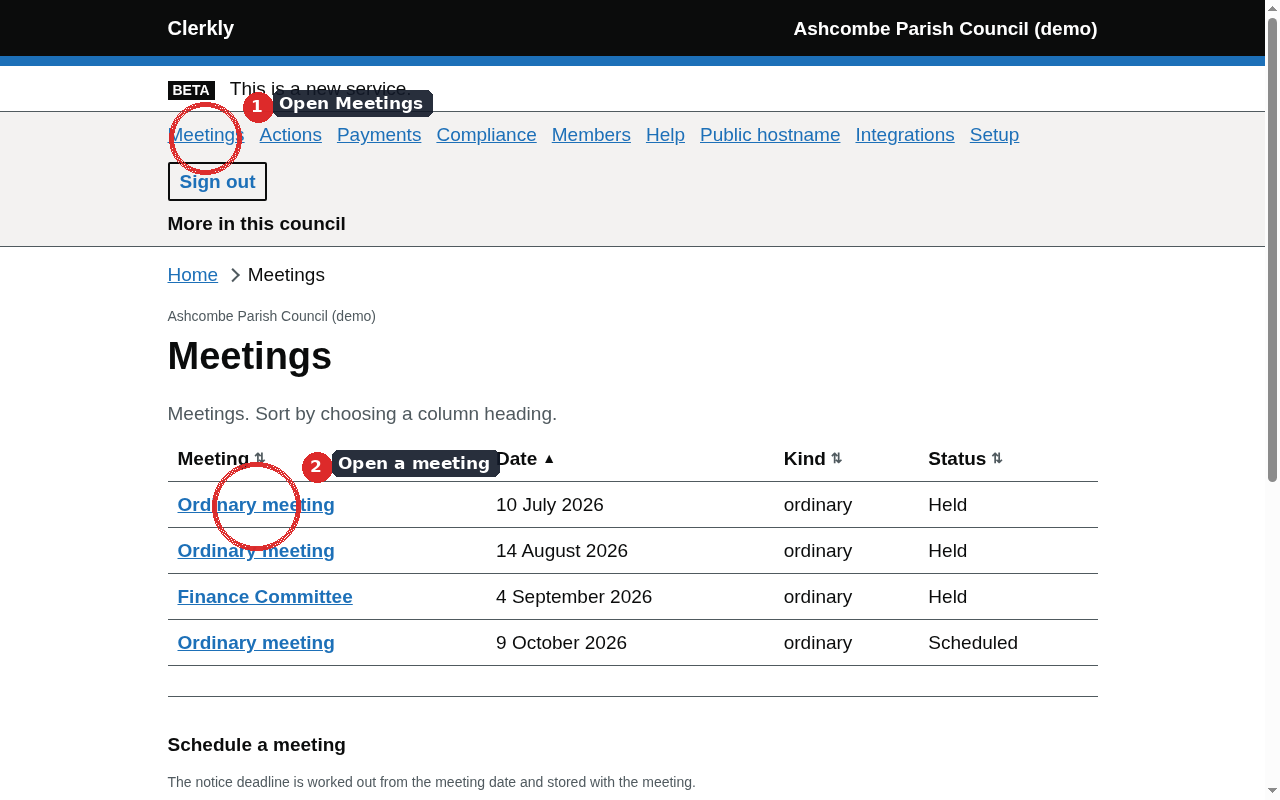
Meetings · /meetings
The meeting list
Meetings lists every meeting of this council. Column headings sort the table. Each row opens that meeting. Status wording is Draft, Scheduled, Notice given, Held, or Cancelled.
Meeting bodies
More → Bodies · /bodies
A meeting has to belong to a body — the full council or a committee. Add bodies on setup or on the meeting bodies page before scheduling. A meeting without a body cannot be created.
Schedule a meeting
A clerk or assistant uses Schedule a meeting at the bottom of the Meetings page.
Title
The name as it will appear on the notice and the public site.
Date and start time
The date is a calendar day. Start time is recorded in UTC.
Meeting body
The full council or the committee this meeting belongs to.
Kind
Ordinary, Annual, Extraordinary, or Committee.
Venue
Where the meeting is held, as it will appear on the notice.
The notice deadline is worked out from the meeting date when the meeting is scheduled, and stored with it, so the date a clerk was shown is the date later evidenced even if the register changes afterwards.
The meeting page
Meetings → the meeting · /meetings/{id}
The meeting page has two focal questions: the notice position and the minutes position. Each is reported as dates and a comparison, not as a conclusion.
Notice of a meeting
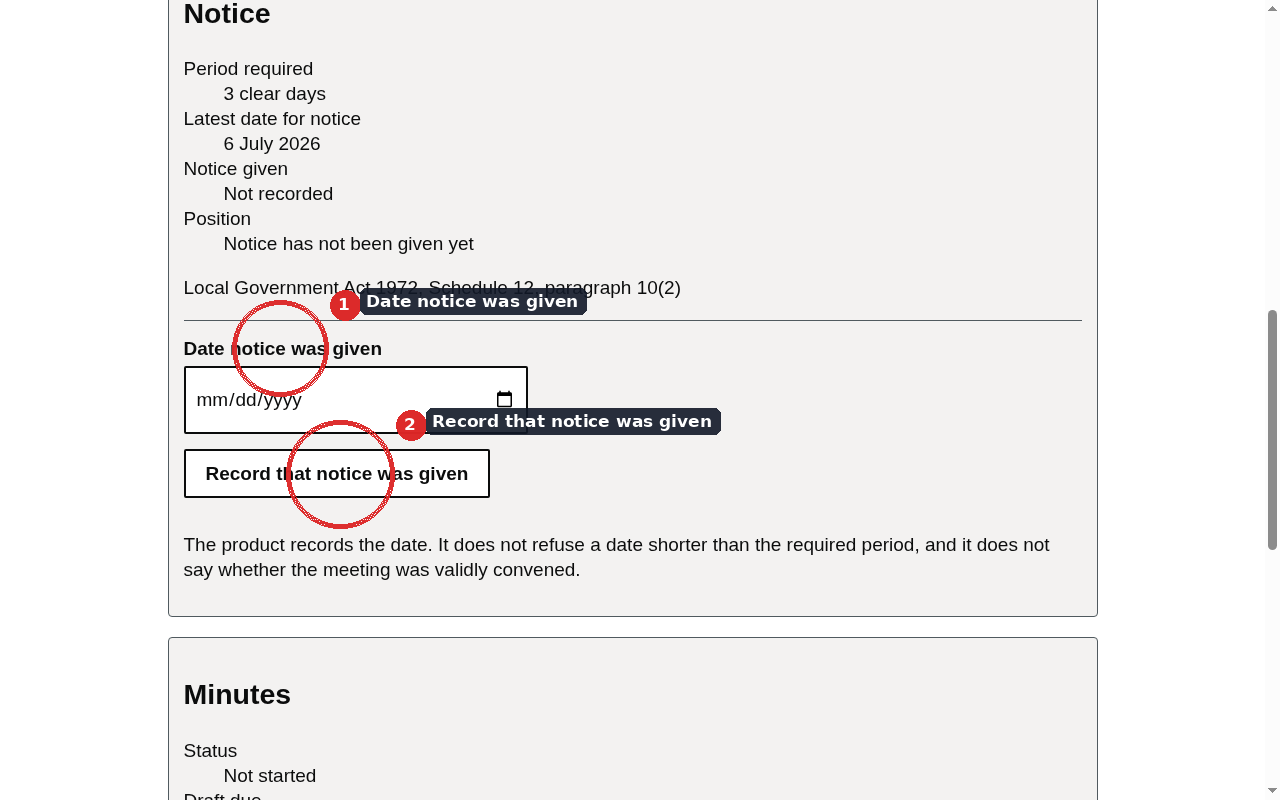
The meeting page shows the period required and that notice has not been given yet.
Record notice given takes a date only. The product records that date. It does not refuse a date shorter than the required period, and it does not say whether the meeting was validly convened.
The comparison after a date is recorded: the notice given met the required period, or it was shorter.
Notice comparison wording.
The page says
Notice has not been given yet
The notice given met the required period
The notice given was shorter than the required period
Publish the public notice on the public site is available to the clerk after notice has been recorded and an agenda exists. The form asks for the proper officer’s name and title. The published notice is an evidential document with a digest.
Held or cancelled
Record that the meeting was held writes that the meeting took place. Notice does not have to have been recorded first. Cancel records the reason and refuses a meeting already recorded as held. A held meeting is not edited through the ordinary schedule form; a correction to minutes is a later version.
The agenda
Meetings → the meeting → Agenda · /meetings/{id}/agenda
Start the agenda
Creates a draft. Positions stay contiguous from one after every change, because the numbering is what a minute refers back to.
Add item
Heading and body. Optional: “The public is excluded from this item”, with the ground. A confidential item cannot be saved without the ground.
Move up or down
Keyboard-accessible reorder. Drag is not implemented.
Upload papers
PDF or Word. A virus-scan status is shown before the paper is treated as available.
Build matters arising
Pulls open actions onto this agenda. It does not copy them: one action remains one row.
Issue the agenda
Locks editing. A change after issue is a new agenda. An issued agenda refuses every edit: it went out with a notice period attached.
Issue summons
Generates the summons, stores it with its digest, and records delivery against each member it went to. Email is sent when outbound mail is configured.
Publish the agenda on the public site is a clerk action on the meeting page once items exist. Confidential items are omitted from that published agenda by the same database predicate that hides them everywhere else.
Excluding the public from an item
Whether an item is confidential is answered by the database rather than by an application filter, so a resolution or minute entry taken under a closed item is kept out of every published output by the same predicate that hides the item.
Minutes
Meetings → the meeting → Minutes · /meetings/{id}/minutes
A set of minutes is a version. Saving after approval starts a new version; the signed text stays in the minute book.
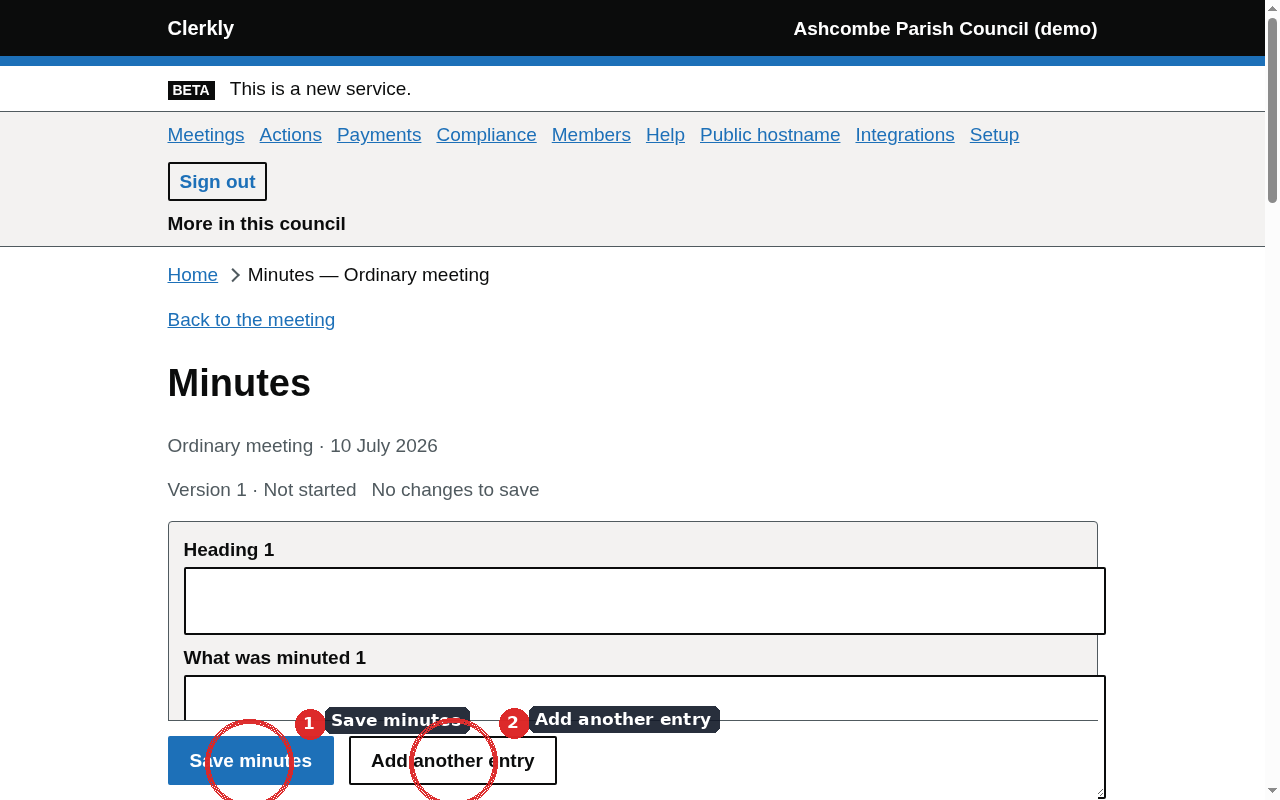
Take or edit minutes as heading and body entries. Save minutes writes the draft. An unpublished draft also autosaves.
Add another entry appends a row.
Draft the minutes builds a first draft from the agenda, attendance, declarations, recorded resolutions and any notes pasted into the box. It appears only once the clerk has switched AI assistance on from the council page. The draft fills the form but is not saved, and autosave is paused until Save minutes is pressed. Items taken with the public excluded are never sent; each gets a placeholder to write by hand. Recorded resolutions are carried word for word.
Attendance is one record per member per meeting: Present, Absent, Apology received, Apology accepted, Arrived late, Left early, or Not recorded. An apology is not attendance.
A resolution is recorded against the agenda item it was taken under.
An action arising from the meeting is recorded here and persists on the Actions register.
The meeting page shows the minutes status: Draft, Circulated to members, Approved, or Superseded. Approving a version does not edit it. A correction approved at a later meeting displaces the previous approval in one transaction, so the meeting is never briefly unminuted. What was signed is recorded as a digest over the content alone.
The minutes page can recompute that digest. When the stored text and the approval digest differ, both values are shown, so the difference can be looked into rather than asserted.
These minutes have been approved appears after approval. Saving then starts a new version. The approved version stays in the minute book with the digest recorded at approval.
Minutes publication comparison on the meeting page.
The page says
The draft has not been published yet
The draft was published within the period
The draft was published after the period
Public participation
Meetings → the meeting → Participation · /meetings/{id}/participation
A meeting of a parish or community council is open to the public. Standing orders commonly provide a period during which members of the public may speak. What is said forms part of the proceedings that the minutes record.
A contribution is recorded against the meeting it was made at, with a summary of what was raised and, optionally, the speaker’s name and the meeting’s response. The name is optional because it is personal data with a short retention rule; the summary is the record of the business.
Officer decisions
More → Officer decisions · /officer-decisions
Where an officer takes a decision under a power delegated by the council, a written record of certain of those decisions must be made available. Each row is one recorded decision: the title, what was decided, the date, who decided it where that is known, and the standing order, financial regulation or other authority named as the delegation. The product stores those facts. Whether a particular decision had to be recorded is not answered here.
Declarations of interest
A declaration is recorded against the meeting and, where it relates to one item, against that item. Whether the member withdrew is recorded separately from the declaration itself, because they are two facts. A member sees their own declarations in My council; the clerk sees all of them.
Non-attendance
A member who fails throughout a period of consecutive months to attend any meeting of the authority ceases to be a member, unless the failure was due to a reason approved by the authority before the period expired. Source: Local Government Act 1972, section 85.
The product reports the dates and the interval, counting committee attendance for members of that committee. An apology, accepted or not, is not attendance. Whether a seat has been vacated is a legal conclusion about a named person, and it belongs to the council and its monitoring officer.
Chapter 6Publication and evidence
Agenda, notice and minutes can be published to the council’s public site. Each publication keeps a SHA-256 of the exact bytes served.
Meetings → the meeting · Publish controls on the meeting page
Who publishes
Publishing and withdrawing are clerk actions. A councillor may read the position and may not write it.
Publishable states
How a notice, agenda or set of minutes is described on the meeting page.
State
Meaning
Not published
No public row yet
Scheduled
A publication time has been recorded and has not yet been served
On the public site
The current bytes are what a resident is served
Withdrawn from the public site
A later row removed them; the previous publication remains the evidence
Publishing
Publish the public notice on the public site — after notice has been recorded and an agenda exists. Proper officer name and title are part of the record.
Publish the agenda on the public site — once items exist. Confidential items are omitted.
Publish the minutes on the public site — once a draft exists. Closed-session content is omitted from the published text.
Republish — writes a new row with a new digest. The previous row remains.
Withdrawing
Withdraw from the public site asks for a reason. Withdrawal is a new row. The previous publication remains the evidence. The public site stops serving those bytes; the evidence page still shows them.
Publication evidence
Meetings → the meeting → View publication evidence · /publications/{id}/evidence
The evidence page shows the digest of the exact bytes served, the time they were published, and the history of publish, republish and withdraw rows. Optional timestamping against a timestamp authority is recorded when that service is configured. The page states what was stored. It does not say a publication met a duty.
Generated copies are also available as PDF/A-2u. CI validates those generated files. Uploaded council PDFs are out of that gate.
The stored summons
The summons as issued · /summons/{id}
The summons page shows the HTML as issued, with its digest. That is the copy that went to members, not a later edit of the agenda.
Chapter 7Actions
An action is one row that persists across meetings. There is no statutory form for an action register.
Actions · /actions
Carrying an action forward puts it on the next agenda; it does not copy it, so a council has one record of each commitment rather than one per meeting it was discussed at. The register shows how many agendas an action has reached, counted from the audit trail.
Working the register
Owner — a membership of this council.
Due date — optional. Urgency wording is Overdue, Due soon, Not yet due, No due date, or Settled.
Carry forward — available from the agenda builder as Build matters arising, and counted on the register.
Settle as completed or cancelled. A settled action is not reopened. A council returning to the matter raises a fresh action, so the register keeps both facts.
A clerk or assistant can manage actions. A councillor sees their own on My council.
Chapter 8Payments
A payment a meeting approved is one amount on the schedule, the ledger and the transparency report.
Payments · /payments
The payment flow
Stages shown on the Payments page.
Stage
What has been recorded
Payment request
A draft schedule exists
Awaiting member signatures
The schedule is waiting for recorded member signatures
Ready for the cashier
The recorded signatures are in place
Released
The RFO has released the schedule as a mandate, a cheque queue, or both
Paid
The payment has been recorded as paid
Cancelled
The schedule was cancelled
Start a draft schedule
A clerk or RFO records the items: payee, amount, method (Bacs, cheque, card, direct debit, standing order, cash), and the minute they hang from.
Record member signatures
Two members of the council are recorded against the schedule. An officer records a wet signature or an in-person authorisation against another member. A member who holds the permission signs in the product against their own membership.
Conflicts are refused
A member whose display name matches a payee, or whose recorded declaration names that payee, is refused.
The RFO releases the schedule
As an online-banking mandate, a cheque signature queue, or both, according to the methods on the items. Release is not “approval”: approval is the signatures.
Once released, the approved amount flows to the ledger and to the transparency report as that same amount. An entry recorded in error is withdrawn rather than edited.
Chapter 9Finance records
Finance screens record receipts, payments, registers and the figures that sit beside the annual return. They do not decide whether a figure is right.
Writing finance is a clerk or RFO action. Reading it is also open to the chair and to auditors.
Financial years
More → Years · /years
A relevant authority must keep accounting records for each financial year. A year is opened so accounts, payments and the annual return have a period to attach to. Closing it records that receipts and payments will not be posted against it. The annual return and the period for the exercise of public rights can still be recorded against a closed year, because those duties run after the year has ended. Closing a year does not say the accounts were complete, signed or audited. Status wording is Open, Closed, or Audited.
The ledger
More → Ledger · /ledger
Payments authorised at a meeting reach the ledger from the payment schedule, with the amount read from the approved item rather than passed by the caller. Two kinds are recorded on the ledger page instead, because neither has a resolution to read an amount from: a receipt, and a payment taken between meetings by direct debit or standing order. A receipt can also be recorded from an issued invoice, and then names the invoice it paid.
The page lists what has been stored. An integrity check compares the ledger to schedules, annual-return boxes and dates. The page does not say a receipt was the precept, or that a payment was validly authorised.
A council that keeps its accounts in another system and imports its cashbook each month sees those lines under Imported from another finance system, with the file and line each came from. They are totalled on their own and are not added to the receipts and payments above, because they are that system's record. Withdrawing a batch on the Imports page removes its lines from this list.
Invoices and credit notes
More → Invoices · /invoices
An invoice is to someone recorded on People and organisations. Each line has a description, an amount before VAT, the VAT charged and, optionally, a receipts budget heading. The clerk enters the VAT on each line; Clerkly does not decide whether a supply is standard-rated, exempt or outside the scope of VAT. The clerk and the responsible financial officer can draft and issue invoices.
A draft has no number and can be changed or deleted. Issuing it gives it the next invoice number, copies the name and postal address from the person’s record and the council’s VAT registration number if one is recorded on the Council page, and fixes it. An issued invoice is never changed or deleted: a credit note is raised against it instead, numbered in its own sequence and never for more than is left of the invoice. Each invoice can be printed or saved as a PDF from the browser. An invoice is not a ledger entry.
A payment of an issued invoice is recorded from the invoice’s page. It becomes an ordinary receipt on the ledger, in the financial year its date falls in, naming the invoice, and cannot be for more than is outstanding. A receipt recorded in error is withdrawn on the ledger page, and the amount is outstanding again. Outstanding is the invoice less its issued credit notes and the receipts that name it; a payment recorded on the ledger without naming the invoice is not counted. Past due means the due date has passed and something is outstanding. Each person has a statement of account listing their issued invoices, credit notes and payments with a running balance, which can be printed.
A payment reminder can be emailed from an issued invoice that has something outstanding, to the address recorded for the person it went to. It states the invoice, the amount outstanding and how to contact the council. On the invoices page the clerk can set up to three days after the due date for automatic reminders; they are off until set, each goes once, and Clerkly suggests no days. Every reminder, and whether the email could be sent, is listed on the invoice.
A recurring invoice is one the council raises on a repeat, such as an allotment rent. On Recurring invoices (from the invoices page) set it up once: what it is for, who it is to, the lines, the first date and how often it repeats. Early on each date Clerkly makes a draft invoice from it, which appears on the invoices page to be checked and issued like any other; nothing is issued or sent on its own. If the draft cannot be made, for example because the person has been erased or a budget heading is no longer in use, the reason is shown and it is tried again each morning until the recurring invoice is changed. Its dates appear among the council’s own dates on the reminders page and are emailed about on the council’s reminder schedule. Stopping a recurring invoice leaves the drafts it made.
The clerk can let payers pay by card through the council’s own card payment account, with a card provider or GOV.UK Pay. On the invoices page, either connect the card provider account by signing in to it on the provider’s own page, or save the account’s key, add the webhook address the page shows to the account and save the webhook signing secret; then switch card payments on. Only one account takes payments at a time. For GOV.UK Pay, a payment is also checked with GOV.UK Pay when the payer returns from its page, so one that was cancelled or declined is listed as not taken. A saved key and secret are stored encrypted and never shown again. Disconnecting a connected account also withdraws Clerkly’s access to it, and if the council withdraws that access from the account’s own settings, card payments stop. While card payments are on, each issued invoice with something outstanding carries a pay link, printed on the invoice. The payer’s page shows the council, the invoice number and what is outstanding, and nothing about the payer; paying opens the card provider’s own page, so Clerkly never sees card details and takes no fee. When the provider confirms a payment it is recorded as a receipt against the invoice. A payment that cannot be matched, for example because the invoice was paid another way meanwhile, is listed on the invoice for the clerk to record by hand. The provider’s fees come out of the council’s payouts and are not recorded in Clerkly.
Budget and the chart of accounts
More → Budget · /budget
The responsible financial officer determines the form of the accounting records, including the headings against which receipts and payments are kept. The budget is the council’s own allocation; the headings are not a statutory code.
Headings the council has recorded appear with the budgeted amount stored against the financial year and the live ledger total on that heading beside it. The difference is budgeted minus ledger. The page does not say whether a difference is a problem, or whether a heading is the right one for a payment.
Assets, reserves and investments
Assets (/assets)
Assets the council has recorded. The held total as at the year end sits beside box 9 on the English annual return and is not copied into the box. Land and buildings still held are listed on the public finance page. A disposal is a date on the row, not a delete. An asset can point at one of the council’s places, which links it to OpenStreetMap. The page does not revalue, depreciate, or say whether an item is an asset.
Reserves (/reserves)
The held total and the earmarked and general split as at the year end sit beside box 7 and are not copied into the box. A closing date is a date on the row, not a delete.
Investments (/investments)
Short-term investments. The held total as at the year end sits beside box 8. Long-term investments belong on the assets page.
The precept
More → Precept · /precept
A parish or community council precepts on its billing authority. The amount is charged as a sum per Band D equivalent dwelling, and every other band pays a statutory proportion of that Band D figure. The proportions are held in ninths of Band D.
The precept page divides the proposed precept by the tax base the billing authority published, and shows the Band D figure and the amount for each band. The sentence it produces states the figures and stops. It does not say an increase is modest, or necessary.
England has eight bands, A to H. Wales has nine, A to I, for years beginning on or after the rebanding. Each country’s proportions are resolved from the statutory register with its own citation.
Bank reconciliation
More → Reconciliation · /reconciliation
A pasted statement is stored against the financial year. The page shows suggested pairings with the ledger, unmatched lines, and whether the figures agree. It does not mark a ledger entry as reconciled, and it does not say the records are correct. Open Banking is not built.
Transparency
More → Transparency · /transparency
Whether the Code is in scope follows from the turnover band recorded for the council. The publication threshold for individual items resolves from the register for the date in question. Payments recorded in the ledger above that figure are listed, each traced to the minute that approved it. The page does not say the council has met the Code. The public list is on the council’s public finance page.
Section 137
More → Section 137 · /s137
A parish or community council may incur expenditure for purposes not otherwise authorised, up to a limit calculated from the number of electors. The power does not authorise a council to spend on a purpose for which it already has a specific power. Source: Local Government Act 1972, section 137 and Schedule 12B.
Payments recorded under the section are listed against the financial year. The page shows the total recorded, the electorate, the per-elector figure from the register for that year, and the arithmetic remainder. An amount that takes the running total past the limit is stored, not refused. The page does not say whether a particular payment was authorised under the section, or whether the council has gone past what the power allows.
Community Infrastructure Levy
More → CIL · /cil
A parish council that received Community Infrastructure Levy receipts in a financial year must prepare an annual report for that year, publish it, and send a copy to the charging authority, by a date held in the register.
Receipts recorded against a financial year are what make the reporting duty appear on the compliance page for the year just ended. The date the annual report was published is recorded separately. The page does not say whether a payment was the neighbourhood portion, or whether a published report met the regulation.
VAT reclaims
More → VAT reclaims · /vat-reclaims
VAT stored on live ledger rows is totalled on the VAT reclaims page. A claim records the period, the amount, and the dates the council entered. The page does not choose a scheme or say whether the council must be registered.
Connect HMRC authorises BizHub365, the partner that sends returns to HMRC, to act for the council. Disconnect HMRC removes that authorisation. Clerkly does not hold HMRC tokens.
Once BizHub365 is connected, VAT returns in BizHub365 lists the council's returns held there, each with its nine boxes and, beside them, what the ledger records for the same period: receipts and payments, net and VAT. Those are the ledger's figures, not a suggested return. Create a VAT return takes HMRC's period key, the period and boxes 1, 2, 4 and 6 to 9; BizHub365 works out boxes 3 and 5, and boxes 6 to 9 are whole pounds. An open return can be changed or deleted here. A return finalised in BizHub365 has to be reopened there first, and a return filed with HMRC cannot be changed or deleted at all. Each change is recorded in this council's audit trail.
Filing a VAT return with HMRC
Filing is done by the responsible financial officer, signed in with two-step verification: an authenticator app code or a passkey, set up under Account, Security. A sign-in without it cannot file; sign out and sign in again once it is set up.
Save the council's VAT registration number, then select Check HMRC for VAT periods. HMRC's periods for the last year are listed with their due dates and whether HMRC shows them as filed. For an open period with no return here, Create a return for that period and enter its figures.
Under File this return with HMRC, confirm HMRC's declaration and select Email me a confirmation code. A six-digit code is emailed to you and lasts ten minutes. Enter it, confirm the declaration again, and select Send the return to HMRC. BizHub365 sends exactly the figures shown, and the return is then shown as filed, with the time HMRC processed it, and can no longer be changed. If HMRC does not accept it, the return stays open with HMRC's reason beside it.
HMRC requires information about the device used to file, such as the browser, screen size and time zone, and the address and port the request came from. The page collects these when it opens and they are sent with each HMRC request, as HMRC's fraud prevention rules require. To find the port, the browser asks a public STUN server run by Google which address and port it appears from; nothing else is sent to it.
Chapter 10Compliance and the annual return
The compliance position states what the law requires, by when, and whether this council has a record of having done it. Each obligation cites its source.
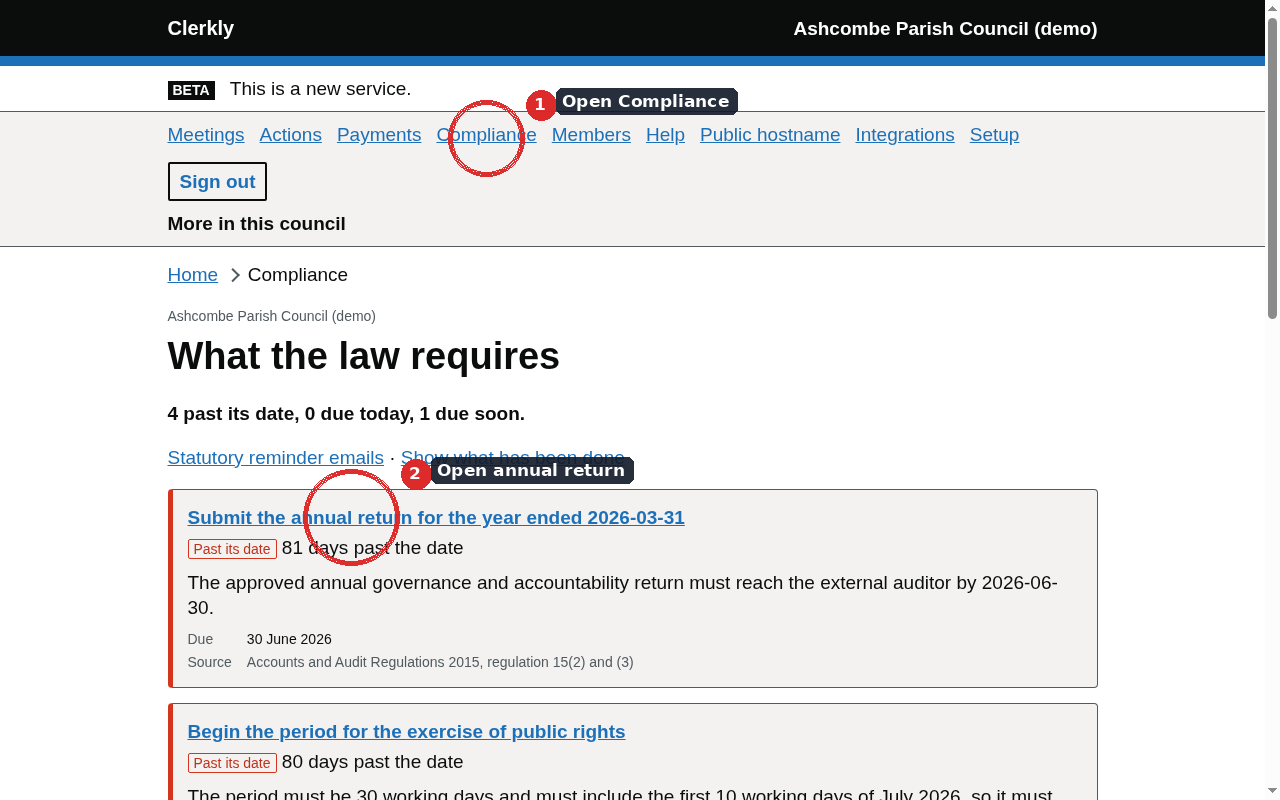
Compliance · /compliance
The page is titled “What the law requires”. It lists statutory obligations with a state badge, a due date, the legal source, and a link to the related screen.
Obligation states. These are facts about dates and records.
State
Meaning
Past its date
The date the register names has passed and no completion has been recorded
Due today
The date is today
Due soon
The date is approaching
Not yet due
The date is still ahead
Done
A completion date has been recorded
Does not apply
The obligation is not in scope for this council’s country or band
Calendar and reminders
Calendar (/calendar) is the same obligations grouped by month. Reminders (/reminders) schedules advance, due-today, overdue, and overdue-copied-to-the-chair messages around those same dates. Audience is the clerk, or the clerk and the chair.
Reminders also lists the council’s own dates: things the council schedules for itself, such as a play area inspection every month or a consultation closing date. The clerk gives each a title, a first date and, if it repeats, how often: every so many days, weeks, months or years. A monthly date on the 31st falls on the last day of shorter months and returns to the 31st after them. These dates are emailed on the same reminder schedule as the statutory ones and are the council’s dates, not statutory ones; the email cites no law. Marking one done records when it was done and stops its reminders; a repeating one moves to its next date. Archiving an item stops its reminders and keeps its history.
The annual return (England)
More → Annual return · /agar
The workspace shows live evidence per assertion and never pre-answers. Assertion templates are for English councils.
Open the financial year from the annual return list if it is not already open, then open the return.
The workspace (/agar/{id}) shows each assertion with the evidence this product already holds. A clerk can attach supplementary evidence by hand.
Answers are Yes, No, or Not covered. The product does not pre-answer.
Accounting boxes are figures the council enters. Ledger totals sit beside them as what this product already holds, not as filled-in boxes.
Published wording of an assertion has to be transcribed from the issued form before the return can be marked submitted.
Route wording is Certificate of Exemption or Limited assurance review, once recorded. The product does not certify exemption.
A return cannot be marked submitted while an assertion is unanswered, while the published wording of an assertion has not been transcribed, or while an accounting box has not been recorded.
The Welsh annual return and annual report
A community council must approve its annual return and publish the audited return by the dates in the Accounts and Audit (Wales) Regulations. The English annual governance statement form does not apply. The annual return page records the date approval was given and the date the audited return was published. The product does not transcribe the Audit Wales form and does not say the return was valid.
A community council must also prepare an annual report about its priorities, activities and achievements during the year. The Measure sets the duty; it does not name a calendar day by which the report must appear. The page records the date the report was published. The compliance page shows the duty without inventing a due date.
Notice of conclusion of audit
After the external auditor has issued the certificate, a smaller authority in England must publish the audited statements, the annual governance statement, and a notice of the conclusion of the audit, by the date in the Accounts and Audit Regulations. The annual return page records the date the notice was published. Recording the date does not say the notice was adequate or that the audit is closed as a matter of law.
Internal audit
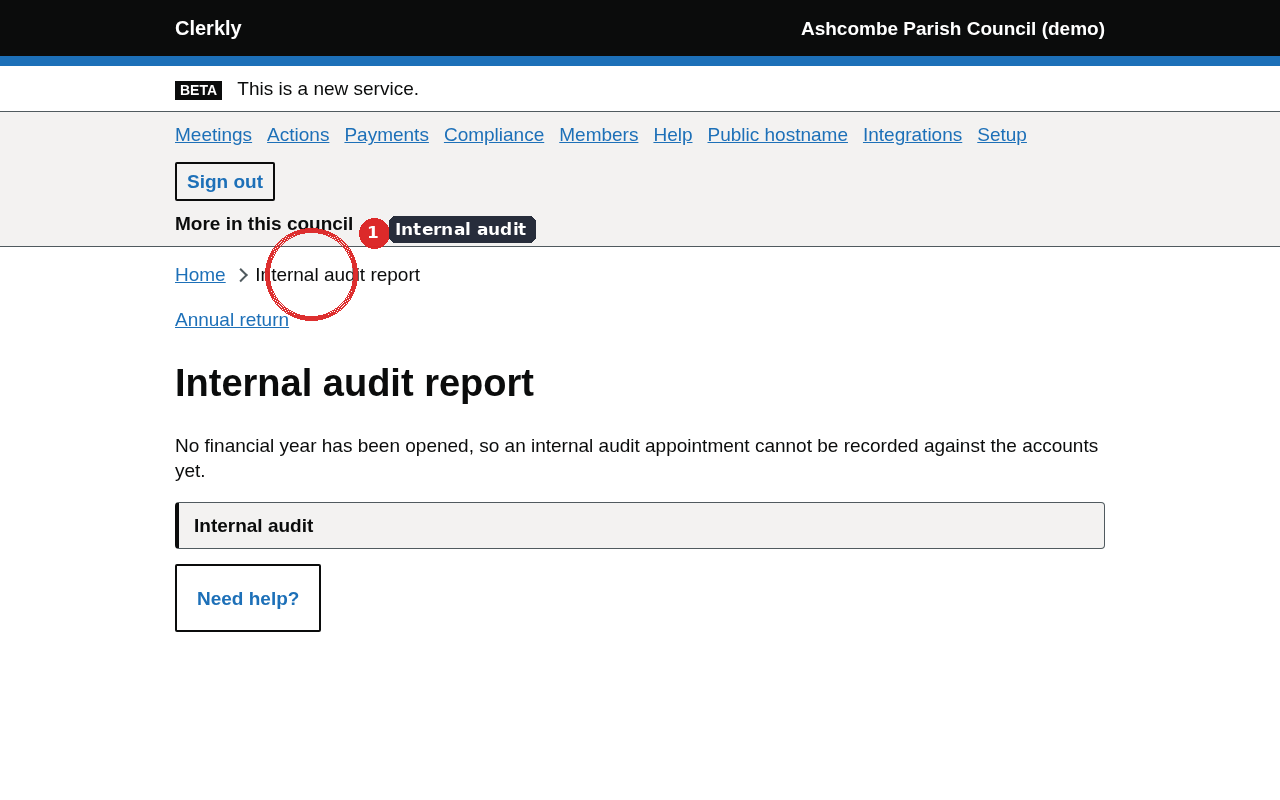
More → Internal audit · /internal-audit
Two records against the financial year, in the order they happen: the appointment, then the report.
A relevant authority must undertake an effective internal audit of its accounting records and of its system of internal control. In England the duty sits in the Accounts and Audit Regulations; in Wales it sits in the Accounts and Audit (Wales) Regulations.
The appointment is who the council appointed and on which date, with a later date for when a report was received; a date before the appointment is refused. The report is the English page of control objectives as the internal auditor answered it, with the name and date beside the signature. The page does not pre-answer an objective. A community council records the appointment and sees no objective templates, because the English form does not apply. Assertion 6 of the English annual governance statement points at both records.
External auditor
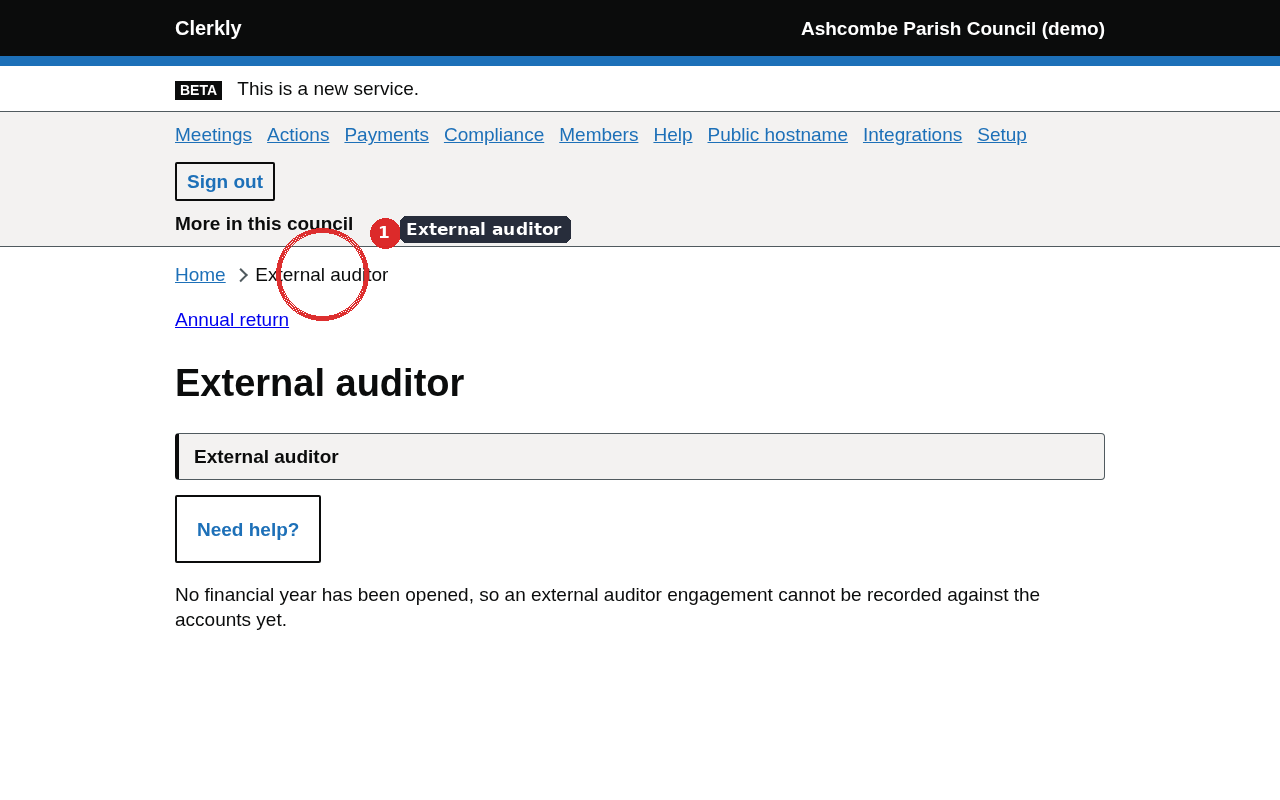
More → External auditor · /external-auditor
The council records which firm it appointed, fees the firm stated, and time-limited access for that engagement.
Record the engagement: which firm, on which date, and a later date for when a report was received.
Fee figures the firm has stated are separate rows, attributed and dated, and require the council’s approval before they appear among the approved figures.
Record the invite (email and name), then Grant access when the council is ready. Access expires with the financial year.
Withdraw access ends it immediately and asks for a reason.
Assertion 7 of the English annual governance statement points at the engagement.
The period for the exercise of public rights
More → Public rights · /public-rights
A smaller authority must give notice of the period during which its accounts and supporting documents are available for public inspection. The period is a set number of working days and must include a specified run of working days in July. Source: Accounts and Audit Regulations 2015, regulation 14. This screen is shown for English councils.
The window within which the period may start is calculated from the register. The dates the council chose are recorded against the financial year, including the date the inspection notice was published.
Information requests and subject access
Requests (/information-requests)
Log a request, record a clarification, and record a response date. Correspondence stays off this product. The page shows the clock the register produces.
Subject access (/subject-access)
A controller must provide information within the period measured in calendar months from receipt. The period may be paused while identity is confirmed. Each request is a row with the dates that drive the clock. The page records that an extension was claimed; it does not decide whether the request was complex.
Casual vacancies
More → Vacancies · /vacancies
Where a casual vacancy arises in a parish council in England, a request that an election be held must be made within the working-day period the rules allow, by the number of local government electors the rules name. The vacancies page records the date the notice of vacancy was published, and later a demand and the number of electors who signed it. The clock runs only where the register has a cited figure for that country. Wales has no cited figure in the register, so a community council can log the notice and sees no period. The page does not say an election must be held.
Personal data incidents
More → Data incidents · /data-breaches
A controller must notify a personal data breach to the Information Commissioner without undue delay and, where feasible, within the number of hours the UK GDPR names, after becoming aware of it. Each incident is a row with the instant the council recorded awareness and, separately, the instant a notification to the commissioner was recorded. The page shows the hour clock from the register. It does not decide whether the incident was notifiable, or whether the commissioner was told in time as a matter of law.
Adopted policies
More → Policies · /policies
A parish or community council adopts standing orders, a code of conduct, financial regulations and a publication scheme, among other documents. Each is a record of a decision taken at a meeting. A review date is a date the council set for itself, not a statutory deadline.
The policy library records the name, the kind of document, the date it was adopted, the meeting it was adopted at, and any review date the council has set. The public site lists documents that have an adoption date. Document text is not stored here: model standing orders are published by the county association to its members and are not reproduced. A file may be attached as the council’s own copy.
Chapter 11Members
The members page lists live memberships of this council. Who may see its working papers is a fact the council records.
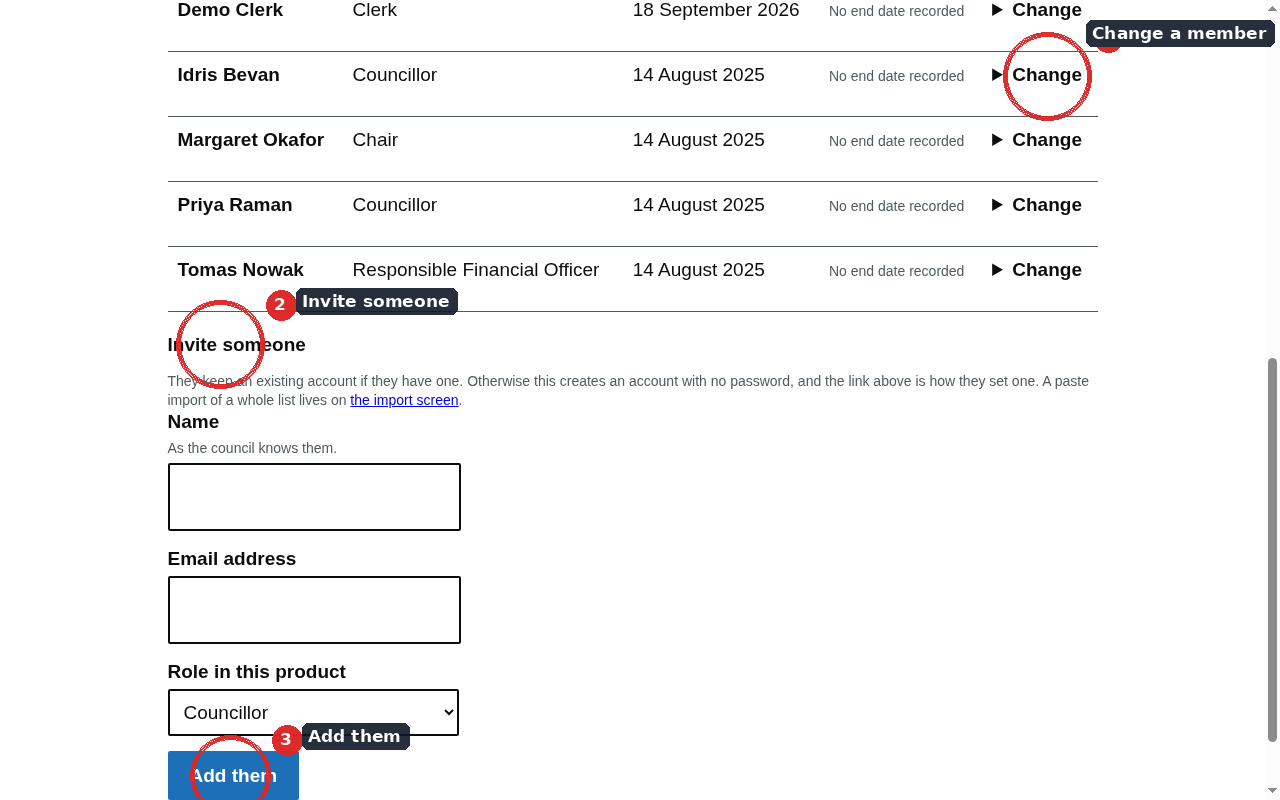
Members · /members
Inviting someone attaches them to this council. The page does not say whether the person holds office.
Invite
Email and role
Councillor, Chair, Clerk, Responsible Financial Officer, Assistant, Internal auditor, or Read only. External auditor access is recorded from the External auditor page against an engagement.
The link
When outbound mail is configured, a set-password link is emailed. Without mail, the clerk is shown the link once on screen. A new account has no password until that link is followed. A person who already has an account keeps that one set of credentials.
End membership or withdraw access
End membership
Records a date the membership ended. The person is no longer a live member after that date.
Withdraw access
Ends access immediately and asks for a reason. Revocation lands on the next request. The page still does not say whether the person holds office.
Chapter 12The public site
Every council has a Clerkly public site. Residents reach published papers on the council’s own hostname, or on a hosted site until one is pointed.
What a resident sees
Pages on the council’s public site.
Page
Content
Home
Recent meetings
Meetings, agendas and minutes
The list and each meeting’s published papers
Payments over the publication threshold
Ledger payments above the register threshold, and land and buildings still held
Policies
Adopted policies that have an adoption date
Councillors
The public list of members
Planning
Links the council has recorded to its planning authority
Contact
The public contact details recorded on the Council page
Publications
The publication index
Accessibility statement
The statement for that public site
Confidential items are excluded from every published surface. Feeds are also offered: Atom, RSS, and an iCalendar of meetings. A JSON list of meetings is at /api/v1/meetings.json on the public origin.
Pointing a public hostname
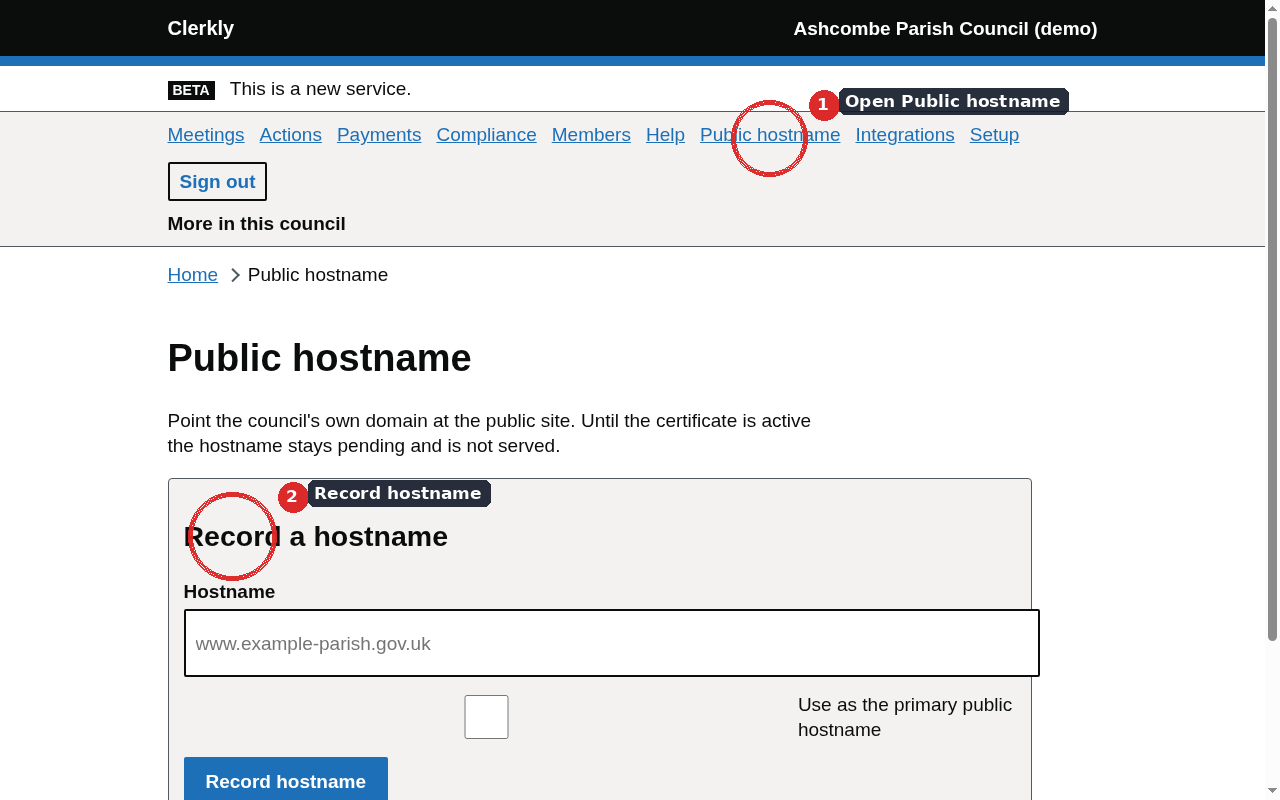
More → Public hostname · /hostnames
A CNAME at the council’s domain is pointed at sites.clerkly.org.uk. Certificate issuance is not enough on its own: the product waits until DNS and the certificate both check.
Hostname status wording.
The page says
Waiting for DNS and certificate
Serving the public site
Certificate verification failed
No longer served. Reserved until DNS is absent
The page lists the DNS records to create, including any certificate-validation records. Removing a hostname stops serving it. The name stays reserved while those DNS records still exist, so it cannot be claimed by another council in the meantime.
Until a hostname is pointed
Published pages are served on the shared host sites.clerkly.org.uk with a council identifier in the address. That is a working public site. Pointing a hostname does not move the records; it changes the address residents use.
Email records for the council's domains
The same page reads what one of the council's domains publishes in public DNS about its email: mail servers, SPF, DKIM at common selectors, DMARC, MTA-STS and TLS reporting. Choose the domain and select Read the email records. Each record is shown as published, with the facts read from it and the line of the GOV.UK government email guidance it corresponds to. Only the domains of the council's contact email, its website and its public hostnames can be checked. The page does not say whether the records are enough, and it cannot see whether mail is actually signed, which TLS versions the mail servers accept, or whether the domain is registered with NCSC Mail Check. Clerkly does not host email or sell mailboxes: a council without email on its own domain can ask its website supplier or a Microsoft 365 provider, then check the records here once they are published.
An MTA-STS policy served by Clerkly
MTA-STS tells other mail servers to deliver to the council's domain only over an encrypted, certificate-checked connection, and to which mail servers. Under MTA-STS policy served by Clerkly, choose the domain, the mode, the mail servers the policy covers (the MX host names the domain publishes) and how long senders keep the policy, then select Save the policy. Start in testing mode: senders report problems but still deliver. Enforce mode means a sender that follows the policy will not deliver over an unchecked connection, or to a mail server the policy does not list, and the page names any published mail server the policy leaves out.
Publish the three records the page lists at the council's DNS provider. Record the mta-sts host as a hostname on the same page, without making it primary, so a certificate is issued for it; Clerkly then serves the policy file there and nothing else. The TLS reporting record keeps any report address the domain already publishes, such as the NCSC Mail Check one, and adds Clerkly's. Reports arrive daily from the larger mail providers and are listed on the page with their successful and failed sessions. Stop serving this policy removes it and its reports; remove the _mta-sts record from DNS as well.
Chapter 13Integrations
Clerkly is the source of truth for agendas, notices, minutes, and evidential documents. Other systems can embed or receive what this product has published.
More → Integrations · /integrations
The Integrations page is a clerk screen. It offers four ways a council’s existing site can show, or be told about, a publication. API access for the council’s own systems is on its own page, described below.
Embed snippet
A script and a placeholder element list published meetings on another site. The public origin also serves /embed/meetings for an iframe and /embed-code with supplier-facing instructions.
JSON list
Suppliers can read /api/v1/meetings.json from the council’s public origin. Clerkly remains the record; the list is a published view of it.
WordPress plugin
The Clerkly Publications plugin embeds meetings on a WordPress site and can receive publication notices. Settings appear under Settings → Clerkly. The shortcode is [clerkly_meetings]. An older spelling of that shortcode still works on sites that already pasted it.
Updates are fetched from Clerkly, not from the public plugin directory. A site still installed under the previous folder name has to deactivate and delete that copy, then install clerkly-publications once. WordPress cannot rename a plugin folder in place.
Publication webhooks
A clerk can register a URL. On publish, republish or withdraw, Clerkly sends a signed POST of what changed. The receiver checks the signature header before trusting the body. Cookbooks for Storyblok, Strapi, Decap CMS, Nuxt Content and WordPress sit with the product documentation.
API access
Council → API access · /api-access
A clerk can issue a token for the council’s own systems, such as a finance package or an asset register. A token that can read lists the council’s assets, meetings and ledger. A token that can send ledger imports sends a month of cashbook, which is staged on the Imports page for the clerk to approve and commit; the API never commits it.
The token is shown once, when it is issued. Clerkly keeps only a fingerprint of it. Every call is recorded in the audit log, calls are limited per minute, and a token acts with the access of the person who issued it: if that person’s role changes or their membership ends, the token stops working. Revoking a token stops it at once.
Managed WordPress hosting of a council site is arranged separately with support. It is not switched on from this page.
Chapter 14Council settings
The council record is the name on the notices, the electorate, the band, and the public details a resident is entitled to see.
Council
More → Council · /council
The Council page holds the name, electorate, turnover band, financial-year end, public contact details, and planning-authority links. Changing the country or the band changes which rows of the statutory register the product will state for this council. It does not reach a conclusion about a named audit route.
Branding
More → Branding · /branding
A council can record a brand colour. The product derives an accessible palette from it — text, links, borders, and a header surface with a contrasting foreground — and previews that palette. A combination that fails contrast is refused at save. The clerk application header and the public site pick up the derived colour. Clerkly’s own wordmark stays Clerkly.
Places
More → Places · /places
A place is somewhere a council record is about: the village hall, a playing field, a bus shelter. Record it once with a name and an address or description, and optionally its UPRN and its latitude and longitude, then choose it on any asset or meeting that is about it. The clerk, the responsible financial officer and the assistant can record places. Each place links to OpenStreetMap: to a marker when it has coordinates, otherwise to a search for its address. Clerkly does not look up or check an address, UPRN or coordinates. A place in use cannot be removed until the records using it choose another.
People and organisations
More → People and organisations · /people
Tenants, hirers, applicants and payers are people and organisations the council deals with who are not its members. They are kept apart from the Members page: they have no account and no role. Record each one with a name, optional contact details and address, and one or more categories saying why the council holds their details. When their dealings with the council end, record the date. The clerk, the responsible financial officer and the assistant can record, change and erase people; councillors cannot see them.
The clerk records how many months the council keeps each category after dealings end, from the council’s own retention schedule. Clerkly suggests no period. Where someone has more than one category the longest period applies, and the page shows the date they will be erased; a nightly run erases them on that date. Someone with a category that has no period is kept until erased by hand. Erasing blanks their name, contact details, address and note and cannot be undone. The audit trail records that someone was recorded, changed or erased, never their details.
Chapter 15Account security and billing
The account is the person’s credentials. Billing is the council’s subscription. They are different records.
Account security
More → Account security · /account/security
Sign-in is email and password. A second factor can be added in either of two forms.
Authenticator app
Enrolment shows a scannable code and the secret as text for a set-up that cannot scan. The issuer label shown in the app is Clerkly. After password, sign-in continues at /sign-in/mfa.
Passkey
A device-bound credential. Enrolment and assertion go through the clerk application so the browser sees a same-origin challenge.
Sessions idle out. Repeated failed passwords lock the account for a period. Cloudflare Turnstile is shown on sign-in when that service is configured.
Billing
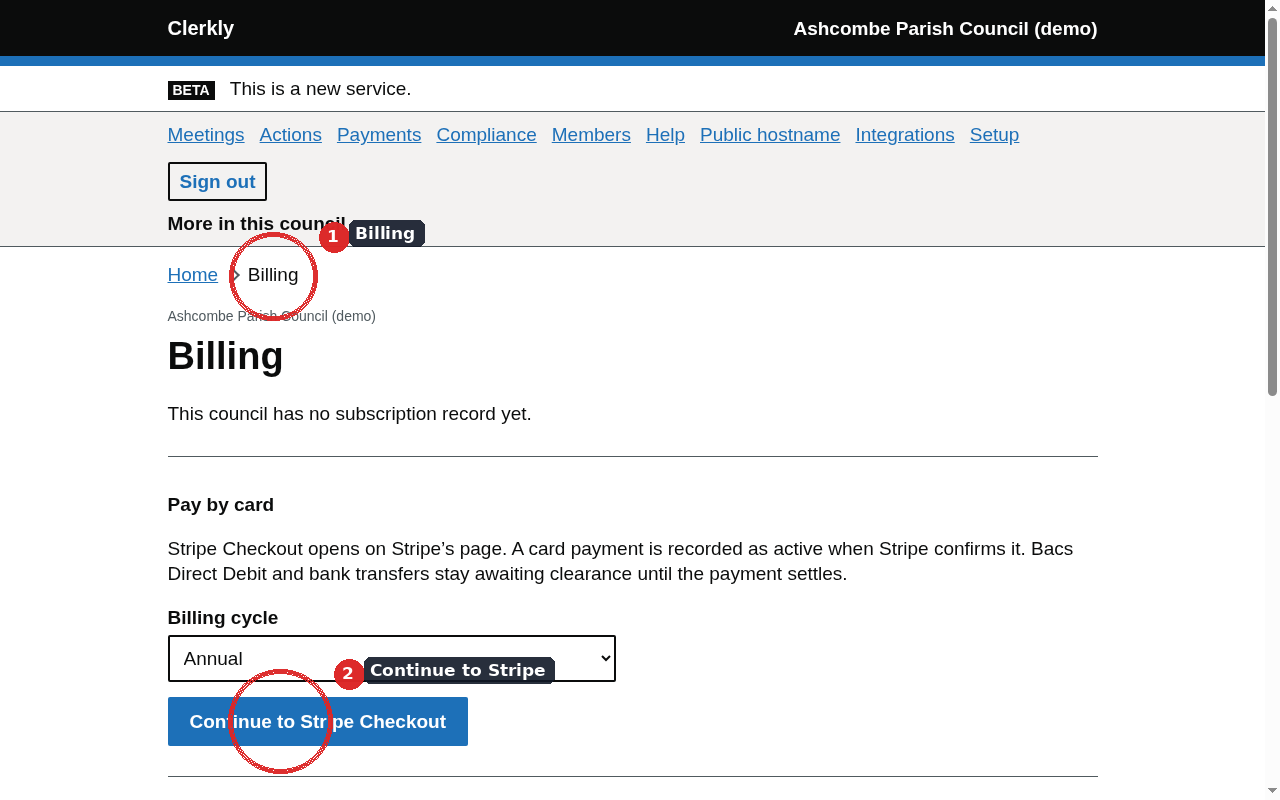
More → Billing · /billing
The page reports the recorded status. It does not invent a paid state.
Subscription status wording.
The page says
What has been recorded
Trial
A trial activation, with an end date
Active
A settled subscription
Past due
A renewal that has not settled
Cancelled
The subscription has been cancelled
Awaiting clearance
A delayed settlement method has been started and has not yet settled
When card payments are configured, the page can start a hosted payment session for the annual or quarterly cycle the service has been given. Delayed settlement methods stay awaiting clearance until settlement is reported. A card payment that has already settled becomes active when that session completes.
Without that configuration the page says billing is not configured and does not invent a paid state. A trial or a manual activation is recorded as those sources, in environments that allow them, and the page says so: that is not a payment.
Until the council has a subscription that opens the app, signing in shows Billing instead of the page asked for. A settled or past-due subscription opens it. In environments that allow trials and manual activations, a trial opens the app until the end date entered and a manual activation opens it too. Awaiting clearance and cancelled do not.
A purchase-order reference can be stored on the row. The page does not display a price. Prices live with the payment service, not in this product’s copy.
Chapter 16Audit trail, export and the statutory register
The product is an evidence system. The trail, the export and the register are how a person reads what was stored.
Audit trail
More → Audit trail · /audit
The audit log is append-only and hash-chained per council. UPDATE and DELETE are refused at the database, including for the table owner. The trail names who acted and pages by id rather than offset, because an id is a stable cursor on an append-only log.
Clerk, RFO, internal auditor and external auditor can read it. The stored before-and-after payloads stay off the wire: they are arbitrary JSON written by every writer in the product and can carry personal data.
Integrity recomputes the chain on demand and reports what it found. The line says what recomputing found and stops. Whether a break means somebody altered the records is a conclusion about a named council.
Export
More → Export · /export
A clerk or RFO can take a complete copy of the council’s data. Completeness is enforced from the database catalogue rather than a hand-maintained list, so a table added later is in the export the day it exists.
The page previews what the copy would contain: table names and row counts. The preview shows counts and no digest.
Download streams the file with the product’s own filename. The file is JSON of every council row, with a content digest inside the file.
Preparing an export records that it was prepared, and the audit log is part of the export, so the file always holds one row more than the preview and the two digests never agree.
Statutory register
More → Statutory register · /statutory
Every seeded key is listed with its rows for England and for Wales, which row is in force for this council today, the citation as a link, and how many rows a person has actually checked against the primary text. Every role can read it: a councillor reading the figure their council is measured against is the ordinary case.
Fees and thresholds
More → Fees and thresholds · /thresholds
The lookups over the register that answer what an audit will cost and which figures a contract is measured against. The figures come from the same rows the rest of the product resolves. They are not written into this guide as numbers, because a printed number goes stale the day the register is updated.
Chapter 17The councillor view
My council is a separate portal for a member who is not keeping the record.
More → My council · /me
A councillor, chair or other member who is not the clerk sees upcoming meetings and their own attendance, the actions they own, and the declarations they have made. The next three meetings list their papers, one tap each, once a paper has passed its virus scan. The page is laid out for a phone first. It does not link to clerk screens. Opening a meeting shows its papers too, and its agenda can be read without the clerk's editing, upload or withdrawal controls, which appear only for the clerk and assistant.
It does not advise on whether to declare. A declaration is recorded as a fact against a meeting. Whether the member withdrew is a second fact.
Confidential agenda items for a meeting the member would sit are readable by a councillor. Publishing, inviting, and writing finance are not.
Chapter 18Help, and where advice lives
Help in Clerkly states the rule and cites the source. Advice on a particular situation belongs to the county association.
Help on the screen
Help · /help
The Help page is titled “What the law requires”. Each topic is narrowed to the council’s country, so an English authority is not shown the Welsh annual return, and the reverse.
The same topics appear as a collapsible panel on the screen they belong to. Every panel has the same headings: What the law requires; In Clerkly; Worked example, where there is one; Source; and a short explainer where a recording exists.
Imported records
Council → Imports · /imports
The Imports page stages normalized rows from a spreadsheet or another council system. Each batch records its source system, file name, SHA-256 digest, source row and status. Staging does not write a live record.
Stage rows
Enter the source details and normalized rows, then select Stage rows for review.
Approve the batch
Review the source, digest and row count, then select Approve this batch.
Commit imported records
Select Commit imported records. The records retain their source attribution.
Withdraw
A committed batch can be withdrawn with a reason. Withdrawal adds evidence and does not delete the original imported record.
An imported record does not say that Clerkly created, approved, published or completed the underlying work. Source-specific spreadsheet, finance and document mappers will feed this same review process.
A month of cashbook comes from a council that keeps its accounts in Scribe, Rialtas, Edge or a spreadsheet. Under A month of cashbook, choose the system and the month, choose the file exactly as the system saved it (Excel or CSV), and select Upload and read the file. The next screen asks two things. First, which row holds the column headings: exports often start with the council name and a title, and Clerkly suggests the right row. Second, what each column holds: under every heading are example values from the file, and beside them a choice of Date, Description or payee, Reference, Budget heading, Receipts, Payments, Amount (payments negative), VAT or Not needed. Clerkly fills in a first guess; check each one against the examples. Columns Clerkly will not use are folded away under Other columns in the file. How does my file show money in and money out? explains the three ways an export can: two columns (choose Money in and Money out); one amount with payments as minus figures (choose Amount); or one amount that is always positive beside a column saying Receipt or Payment, or R or P, as Scribe and Rialtas export it (choose Amount for the gross or total figure and Receipt or payment for that column). Select Check the lines to see how many lines are receipts and how many are payments, with their totals, then every line. Check the counts and totals against your finance system before staging. If every line has come out as a receipt, or every line as a payment, a warning asks you to check the columns, and the month cannot be staged until you tick that it is right. On the first check, lines with no date and no single receipt or payment, such as a note or a total, are ticked to leave out; untick any that should be kept. A line that cannot be read says why; correct the file, change a column, or tick Leave this line out for a line that is not a transaction, such as a totals row. Stage these lines then puts the month into the ordinary approve and commit steps, and next month the same export is mapped the same way. A file already imported cannot be imported again while its lines are kept; withdraw the earlier batch first, and the file can then be imported afresh. Discard this file removes an upload without staging it; uploads nobody stages are removed after seven days. The lines stay imported records tied to the file digest; they are not added to the Clerkly ledger. Paste the cashbook instead still takes a pasted CSV.
Read it with AI appears beside the upload button when the council has switched AI assistance on from the council page. Use it for a PDF, or a spreadsheet laid out for printing. The file is sent to the council's AI provider, which copies it into a table without working anything out and asks about anything it is unsure of: a figure it cannot read, a line that looks like a total. Each question appears under Questions about the file, with what the file shows; answer That is right, It should be, or Leave this line out. The month cannot be staged until every question is answered, and every line still passes the same checks as an uploaded file.
Need help? opens a longer article on the Clerky help portal when one has been published for that topic. Meeting notice, minutes, membership, the annual return, internal audit, the external auditor and the setup wizard have live articles.
This guide
This user guide is the product manual: how the screens fit together, what each button records, and how the three surfaces relate. It is not a substitute for the in-product panel, which stays next to the form it describes and updates with the product.
Advice
For advice on a particular situation:
England: the National Association of Local Councils, which lists county associations — https://www.nalc.gov.uk/
Wales: One Voice Wales — https://www.onevoicewales.wales/
Model standing orders and model financial regulations are published by those bodies to their members and are not reproduced in Clerkly.
Chapter 19Accessibility
The target is WCAG 2.2 Level AA. Customers are public sector bodies; the Public Sector Bodies Accessibility Regulations reference that standard.
Ordinary forms work with JavaScript off.
Focus is a yellow ring on a dark outline, matching the design tokens.
Colour pairs are checked at the token level. A council brand colour that cannot produce a contrasting palette is refused.
Generated evidential documents are served as PDF/A-2u, tagged for reuse of the text.
The public site ships an accessibility statement.
Help videos, where they exist, have English captions.
A problem with a particular screen can be raised with the operator. Tweed Tyne Technologies Ltd owns and operates Clerkly and holds Cyber Essentials certification. Records are hosted in the EU (Amsterdam).
Chapter 20Glossary and screen index
Words as this product uses them, and every clerk-application path this guide names.
Glossary
Clear days
A notice period that excludes the day the notice is given and the day of the meeting.
Digest
A SHA-256 of exact bytes. Used on publications, the summons, approved minutes, and the export file.
Evidence record
An append-only publication row. Withdrawal writes a new row; the previous row remains.
Proper officer
The officer named on a public notice. The product records the name and title supplied at publish.
Register
The statutory configuration register: versioned values with a citation, resolved by key, country and date.
RFO
Responsible Financial Officer.
Summons
The notice sent to every member of the meeting. Stored with a digest and recorded against each member it went to.
Turnover band
The band the council recorded about itself. It decides which transparency and audit rules the product will state.
Verified (register row)
A named person has read the primary text for that row. It is not a certification of the law.